
AI Self-Improvement Tutorial: How Your AI Learns Your Habits
Every reject, edit, and rewrite you make teaches the AI. Here's where to see what it learned, how to approve or veto each lesson, and how to make it learn faster.
You don't configure this feature — you just use the app, and it studies you. Every draft you reject, every edit you make before sending, every one-tap rewrite becomes a signal. Once enough accumulate, the AI analyzes them, works out what you keep correcting, and proposes lessons — which only take effect after you approve them.
This tutorial shows you where that happens and how to make it work harder for you.
🎬 2-minute demo path — showing this live?
- Open Dashboard → Learning history → read one suggestion out loud: the AI noticed a pattern in your corrections.
- Tap Accept → it now shapes every future reply.
- Point at an Auto-tuned row: "it noticed I kept rejecting day-2 follow-ups, so it spaced them out itself."
Step 1 — See what it wants to learn
Open AI Nexus → Dashboard and expand the Learning history card. The top section is Learning Suggestions — lessons distilled from your recent rejections, edits, and rewrite instructions:
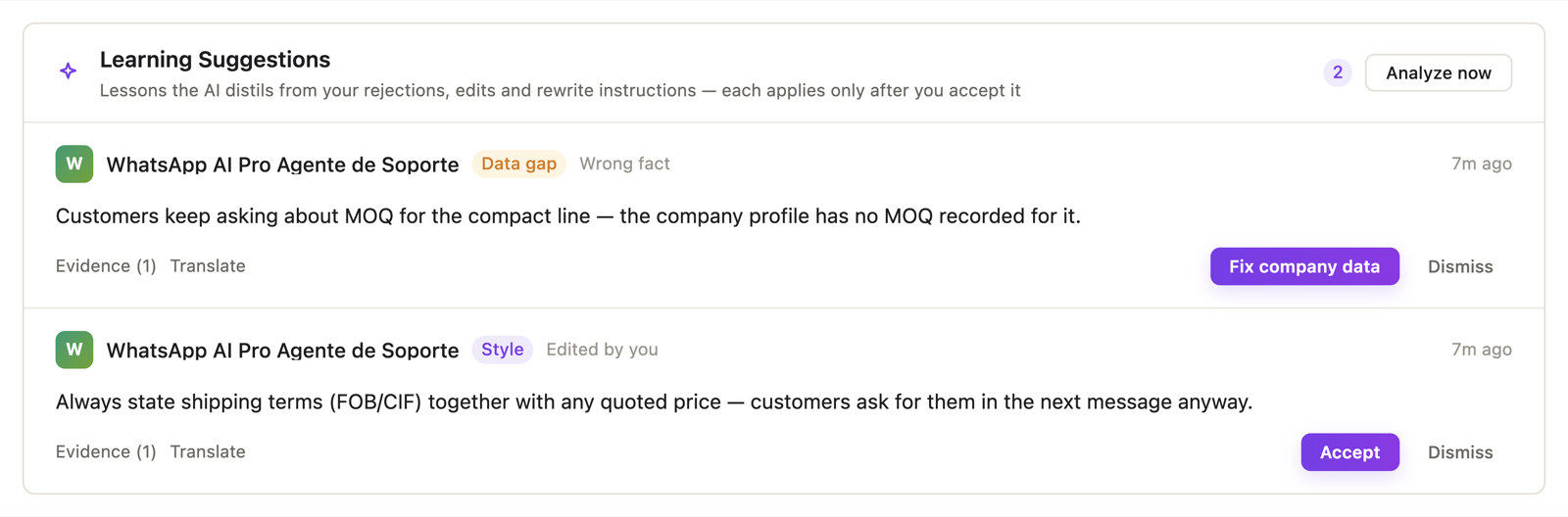
Suggestions come in three kinds:
- Style — "Replies to price questions should lead with the price, not the pleasantries." Accept it and every future draft follows.
- Data gap — the AI noticed it keeps getting a fact wrong because your company info is missing it. The fix button says Fix company data and takes you straight there — facts belong in your profile, not in the AI's habits.
- Insight — an observation worth knowing, e.g. a pattern in what customers push back on. Tap Got it.
Each suggestion shows its Evidence — the actual drafts it learned from — so you can judge before accepting. Not convinced? Dismiss.
✓ Done when you've read your first suggestions and accepted the ones that ring true.
Step 2 — Manage what it has learned
Below sits Applied Lessons — everything currently in force:
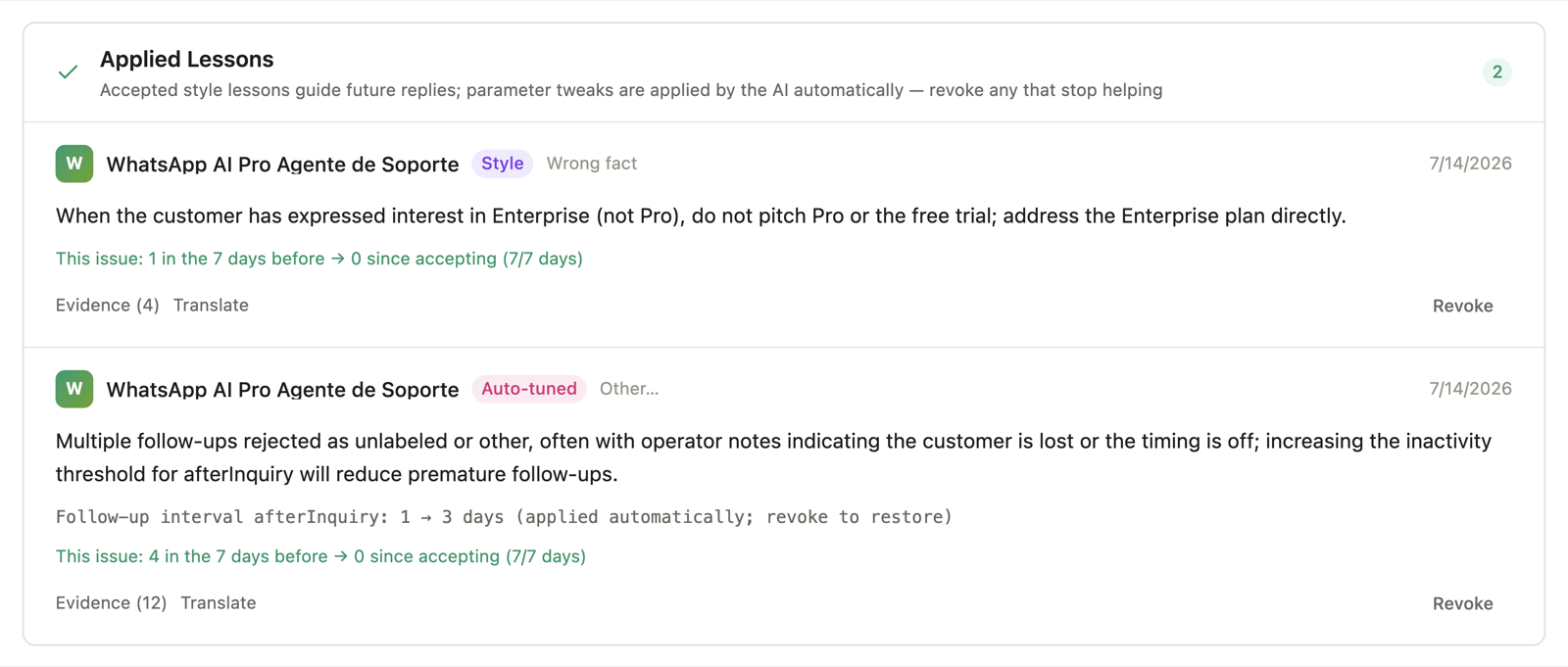
Two things to look at:
- The effect line on each lesson: "This issue: 5 in the 7 days before → 1 since accepting." That's the lesson proving (or failing to prove) its worth.
- Revoke — any lesson that stops helping goes away instantly. Nothing is permanent.
One kind of lesson applies without asking: follow-up pacing. If you keep rejecting day-2 follow-up drafts, the AI concludes you find them pushy and stretches the interval itself — shown as an Auto-tuned row ("Follow-up interval: 2 → 4 days, applied automatically; revoke to restore"). It's only ever allowed to make follow-ups less frequent, never more — and Revoke restores the old pace.
✓ Done when you've scanned the applied list and revoked anything that no longer fits.
Step 3 — Teach it faster (this is the real skill)
The AI learns from labeled corrections much faster than from silent ones. Three habits multiply its learning speed:
- Use the rewrite chips instead of bare rejects. Tapping Wrong tone on a draft tells it exactly what was wrong; a plain Reject leaves it guessing. The chips are everywhere — under desktop drafts and in Telegram notifications.
- Type the instruction when you have 5 seconds. "Include shipping in the price" is a premium learning signal — specific, actionable, in your own words.
- Edit rather than rewrite from scratch. Your before/after diff is studied — approving an edited draft shows it precisely what you changed.
Analysis runs by itself once enough new feedback accumulates (roughly daily at most). Impatient? There's an Analyze now button in the panel.
Things that trip people up
"No suggestions yet." It needs material — a handful of rejects/edits/rewrites before the first analysis. A brand-new install has nothing to learn from; a week of Suggest-mode usage does.
"It learned something wrong." Revoke it. And if the root cause is a wrong fact, fix it in company info — facts always beat habits.
"Will it start doing things I didn't approve?" Style and insight lessons wait for your explicit Accept. The only self-applied change is follow-up spacing, it's clearly labeled, one-directional (gentler only), and reversible.