
AI CRM Tutorial: Your Morning Briefing, Pipeline Board, and Auto Follow-Ups
The CRM that fills itself in: a daily to-do briefing, a promises ledger, a four-column deal board, and follow-ups the AI sends at the right time — here's the 10-minute daily routine.
Nobody on your team will ever "update the CRM" — the AI builds and maintains every customer record from your chats. Your job shrinks to one 10-minute morning routine. This tutorial shows you that routine, screen by screen.
Everything below lives in AI Nexus → Dashboard.
🎬 2-minute demo path — showing this live?
- Open the Dashboard → read today's briefing out loud: "3 things to do today."
- Point at Promises we made — "the AI caught that you told this customer you'd send a quote Friday."
- Scroll to the board: four columns, every card placed automatically.
Step 1 — Start with the briefing: "N things to do today"
The top of the Dashboard is your morning list:
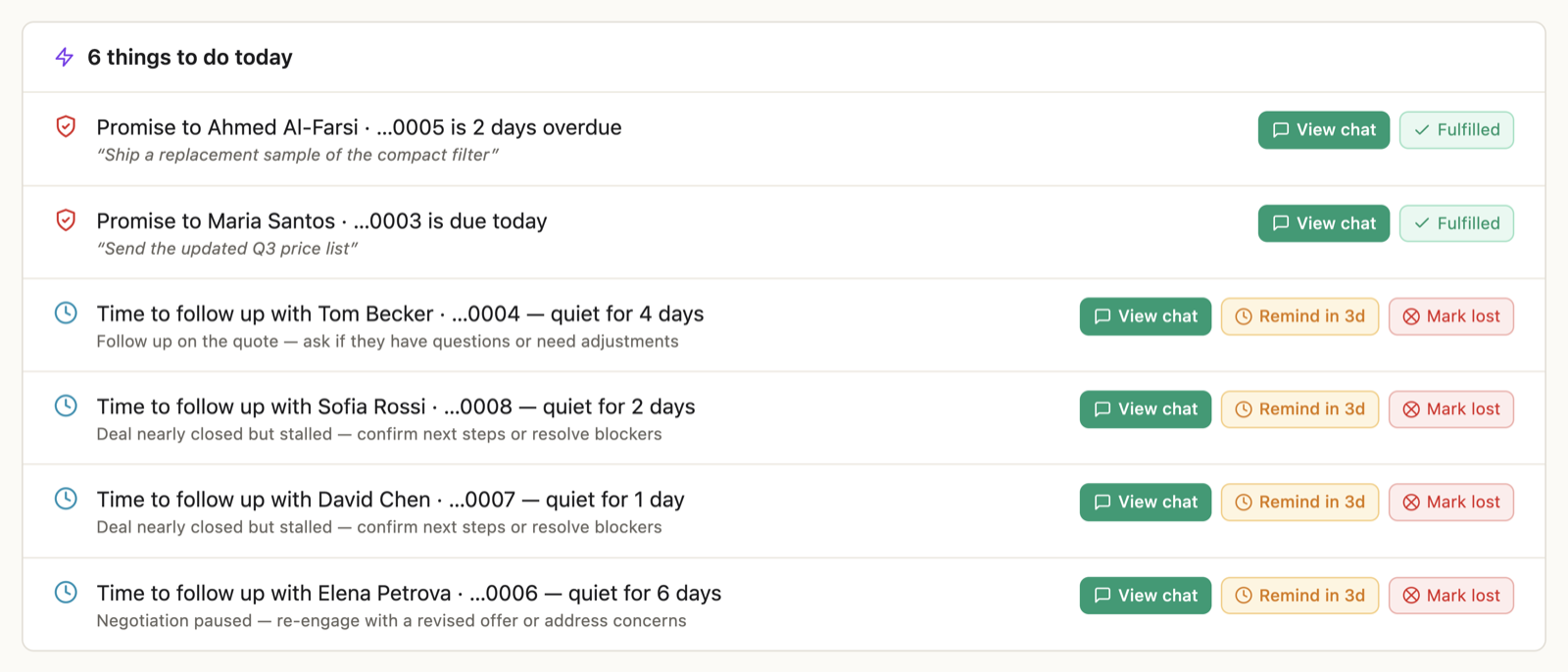
Each line is one customer and one reason, with buttons to act right there:
- "Did Maria's deal close?" → Deal closed / Not yet
- "Carlos will be marked lost in 2 days" → View chat / Mark lost
- "Time to follow up with Ahmed — quiet for 5 days" → View chat / Remind in 3d
- "Promise to Li is due today" → Done / View chat
Handle each line and it disappears. Empty list = "Nothing needs your attention today." The same briefing arrives on your phone every morning if you've connected Telegram.
✓ Done when the list is cleared — most days that's under ten minutes.
Step 2 — Check "Promises we made"
The AI listens to your outbound messages — yours and its own — and records every promise: "I'll send the quote Friday", "sample ships Monday". They're collected in the Promises we made card with due dates:
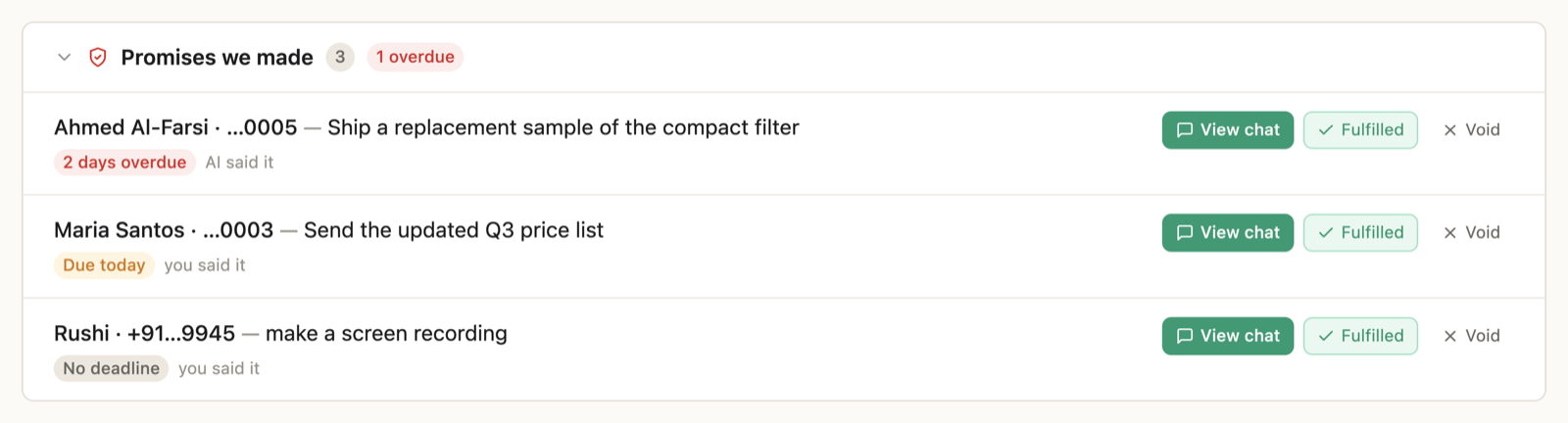
- Overdue or due today → it shows at the top of your briefing too.
- When a promise comes due, the AI drafts the follow-through message for you — promise follow-ups are never sent automatically, you always review them.
- Kept it already? Tap Fulfilled. No longer relevant? Void.
This card is the single best cure for "I told them I'd get back to them… last Tuesday."
✓ Done when nothing in the ledger is overdue.
Step 3 — Read the board
Below the briefing sits the pipeline board — every active conversation filed into four columns, automatically:
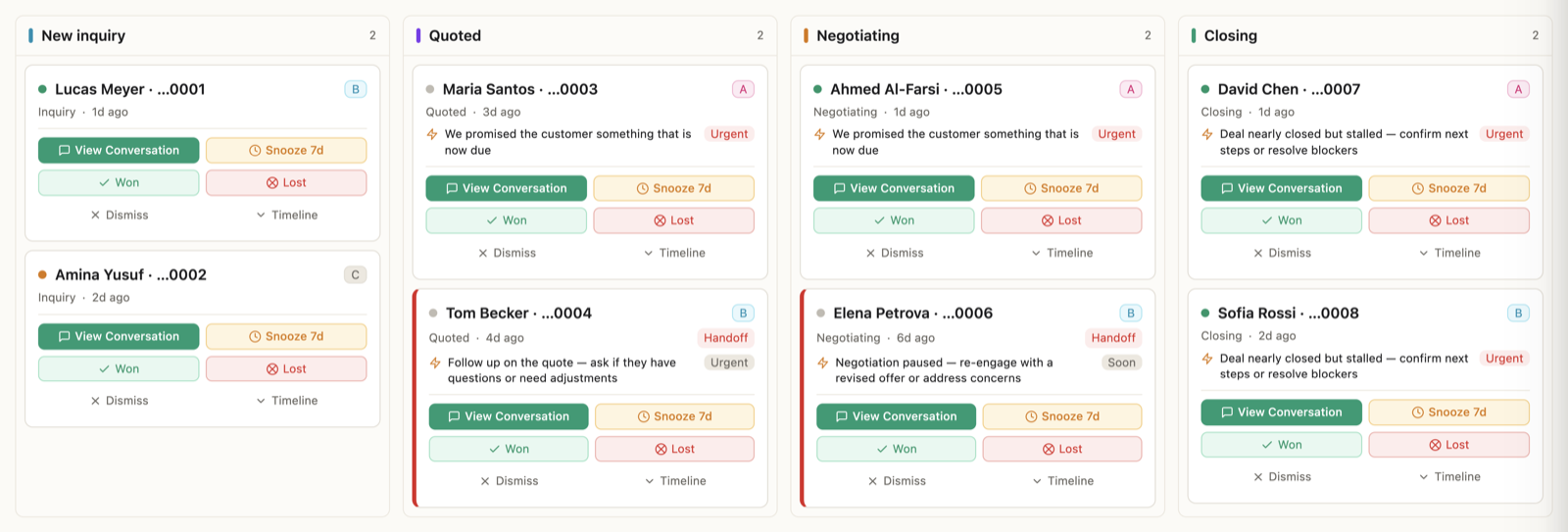
New inquiry → Quoted → Negotiating → Closing. Cards move on their own as conversations progress; if one lands wrong, drag it to the right column.
On each card:
- View Conversation — jump into the chat.
- Won / Lost — close it out. Be honest here; outcomes make everything smarter.
- Snooze 7d — for "contact me next month" customers.
- Dismiss — not a deal, off the board.
Filters at the top narrow by customer tier (A–D), status (Active / Hesitating / Cooling), or flags like needs follow-up.
✓ Done when the board matches reality: finished deals closed, noise dismissed.
Step 4 — Let the AI do the chasing
Between your morning check-ins, the AI watches every deal and follows up on its own schedule: a quote with no answer gets a nudge after 2 days, a sample gets a check-in after 5, an A-tier customer going quiet gets a personal note after 3.
Three things worth knowing about how it behaves:
- Follow-ups reference the real conversation — the product they asked about, the price you quoted. Never "just checking in!"
- They're sent during the customer's local business hours, not at 3 a.m. their time.
- In Suggest mode, every follow-up is a draft you approve first. In Auto mode routine follow-ups go out on their own — promise follow-ups still wait for you.
Want to handle someone personally? Open their contact panel and set "I'll follow up on [date]" — the AI won't touch that customer until your date passes.
Things that trip people up
"Cards are in the wrong columns." Early on, with little history, some land wrong. Drag them where they belong — accuracy climbs quickly as conversations accumulate.
"Follow-ups feel too frequent." Reject the ones you don't like — the AI notices patterns in what you reject and spaces itself out. (You can watch it do this in the learning panel.)
"I don't want any automatic sending." Stay in Suggest mode — every follow-up becomes a draft, nothing more.