
WhatsApp Business API in 2026: Real Costs, Timeline & Whether You Actually Need It
A neutral, up-to-date guide to the WhatsApp Business API — the real setup timeline, 2026 per-message pricing, verification and template rejection reasons, and a decision tree for whether you need the API at all.
"Get started in minutes." Almost every guide to the WhatsApp Business API opens with some version of that promise — and a lot of businesses that follow one end up two weeks deep in verification queues, rejected message templates, and a pricing model that quietly changed in mid-2025. The gap between the pitch and the reality is where most of the confusion lives.
This guide closes that gap. It walks the whole journey end to end — whether you actually need the API, the ways to get it, a realistic phase-by-phase timeline, what it really costs in 2026 after the per-message pricing shift, and the specific reasons applications and templates get rejected — so you can budget your time and money before you start, not after.
First: Do You Actually Need the Business API?
The WhatsApp Business API is not the only way to use WhatsApp for business, and for a lot of teams it's the wrong tool. Meta offers three official ways to run WhatsApp for a business, and picking the right one saves weeks.
The three official paths
| Path | What it is | Setup effort | Best for |
|---|---|---|---|
| WhatsApp Business App | The free consumer-style app (iOS/Android/desktop) | Minutes | Solo owners, one person answering, low volume |
| BSP-mediated Cloud API | Meta's Cloud API accessed through a partner (Twilio, 360dialog, WATI, Infobip…) | Days to weeks | Teams that want a dashboard, broadcasts, support |
| Direct Cloud API | Meta's Cloud API, connected yourself, no partner | Days to weeks + engineering | Product teams with developers who want to build |
A quick decision tree
- Do you just need fixed greeting/away messages and to answer chats manually? → Use the WhatsApp Business App. It's free. Stop here.
- Do you need to send bulk marketing broadcasts, run click-to-WhatsApp ads at scale, or want a verified green badge? → You need the Business API (via BSP if you don't have engineers, direct if you do). Continue to the setup section.
- Are you building the messaging into your own product/backend? → Direct Cloud API. Continue to setup.
One case falls outside all three: if you only want smarter auto-replies on the number you already use — no broadcasts, no badge — you may not need the API at all. A handful of third-party tools connect to your existing WhatsApp account by QR code (the same mechanism as WhatsApp Web), with no verification or templates. We come back to that option at the end; for the rest of this guide, we assume you've decided the API is the right fit.
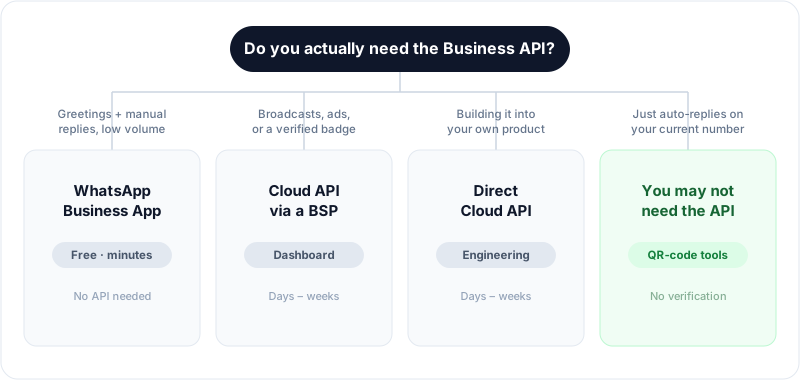
Match what you actually need to a path before you start — it's the single biggest time-saver.
The honest filter: the Business API exists for scale and officialness — high-volume broadcasts, ads integration, multi-agent routing, the verified badge, and messaging embedded in software. If none of those describe you, the API's overhead (verification, templates, per-message fees, a separate number) is cost with no return.
One thing that trips people up: the Business API requires a phone number that is not currently active on a regular WhatsApp or WhatsApp Business App account. You either use a fresh number or go through Meta's number-migration flow, which deregisters it from the app. You cannot run the API and the consumer app on the same number at once.
What the Business API Setup Actually Involves
If you've decided you need the API, here's the full pipeline. The steps are the same whether you go direct or through a BSP — a BSP just handles some of them on your behalf and gives you a dashboard on top.
- Create a Meta Business Portfolio (formerly "Business Manager") at business.facebook.com — your company's container for assets.
- Business Verification. Meta confirms your business is real via legal documents (registration certificate, utility bill, or bank statement) and a domain/phone that match. This is the slowest gate.
- Create a WhatsApp Business Account (WABA) inside the portfolio.
- Register a phone number to the WABA (a number not tied to a consumer WhatsApp account).
- Set a Display Name and submit it for review — Meta checks it against its display-name guidelines.
- Submit message templates for approval. Any business-initiated conversation (you messaging first, outside the 24-hour service window) must use a pre-approved template.
- Connect a webhook (direct API) or configure your inbox (BSP) to receive inbound messages and delivery/read receipts.
- Warm up your messaging tier. New numbers start capped (often 250 business-initiated conversations/24h) and scale up as quality and volume prove out.
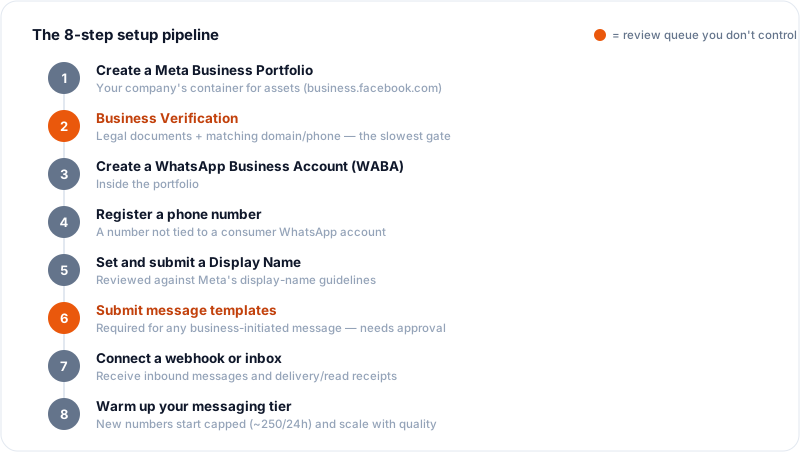
The same eight steps apply whether you go direct or through a BSP — a partner just handles some of them for you.
On-premise is gone — use Cloud API
If you're reading an older tutorial that talks about hosting the "On-Premises API" yourself: that path sunset in October 2025 — Meta's final On-Premises client version expired on October 23, 2025. Meta's cloud-hosted API is now the only option, which is actually simpler — no infrastructure to run, faster access to new features, and Meta hosts it free (you pay only for conversations). Ignore any guide still walking you through on-premise Docker containers.
The Realistic Timeline
The "minutes" promise is true for the technical connection and misleading for the whole process. Here's an honest phase-by-phase range.
| Phase | Fast case | Slow case | What controls it |
|---|---|---|---|
| Meta Business Portfolio setup | 1 hour | 1 day | Just data entry |
| Business Verification | 2 days | 2+ weeks | Document quality; mismatches trigger re-review |
| Number registration | Minutes | 1 day | Whether the number is clean/unused |
| Display name review | Minutes | 2 days | Name compliance |
| Template approval | A few hours | 1–2 days per template | Category/wording compliance |
| Tier warm-up to high volume | Days | Weeks | Message quality + gradual volume |
Smooth path: a few days. Realistic path with any snag: two weeks. The two phases in bold — verification and template approval — cause nearly all the delay, and both are review queues you don't control. Budget for two weeks even if you hope for two days.
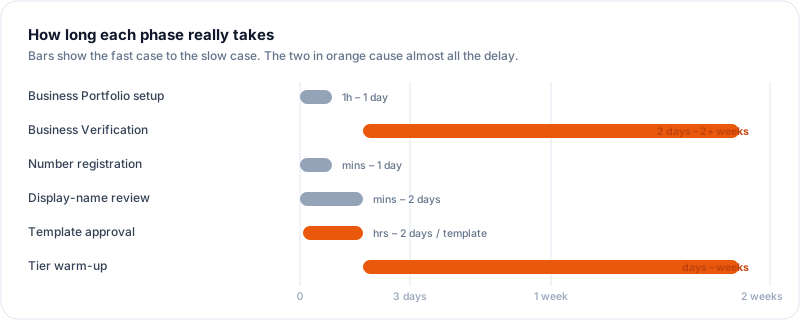
The technical steps are quick; the review queues — verification and template approval — are where the calendar disappears.
2026 Pricing: What It Actually Costs
Pricing changed materially in July 2025, and a lot of ranking articles are still stale on this. Here's the current model, per Meta's official rate documentation.
Per-message pricing (the July 2025 shift)
WhatsApp moved from conversation-based pricing (a flat fee per 24-hour conversation window) to per-template-message pricing for the categories that cost money. The gist:
- Marketing, Utility, and Authentication template messages are billed per message sent, at rates that vary by country (a marketing message costs very different amounts in the US vs India vs Brazil).
- Service conversations (your replies to a user-initiated chat, inside the 24-hour customer service window) are free — unlimited, in every country. This is a big deal: if your use case is inbound support, your Meta message bill can be near zero.
- Click-to-WhatsApp ads and Facebook-Page CTA entry points open a 72-hour free window — conversations started from those ads don't incur the per-message fee during that window.
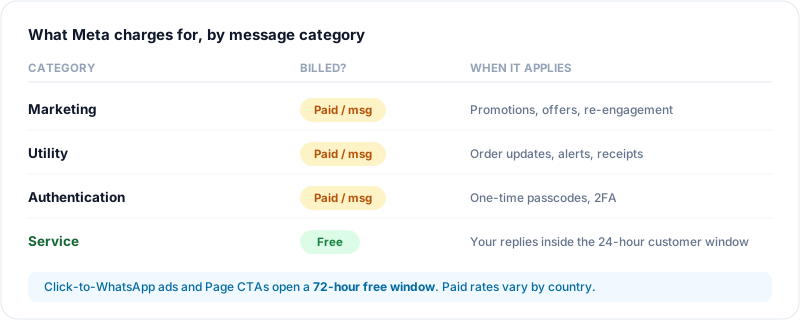
If your use case is inbound support, most of your messages fall in the free "Service" category — your Meta bill can be near zero.
The layer most guides omit: BSP markup
If you go through a BSP, you pay two bills:
- Meta's per-message fees (above), passed through.
- The BSP's own charge — either a monthly platform fee, a per-message markup (commonly in the ~$0–0.02+ range on top of Meta), or both.
So the real cost of "the WhatsApp Business API" through a partner is Meta fees + platform subscription + markup + per-seat/user charges. A small team running marketing can clear $100–200/month all-in once these stack, even though the headline platform fee looked like $20–40. Going direct (no BSP) removes the markup and subscription but adds the engineering cost of building and maintaining the integration yourself.
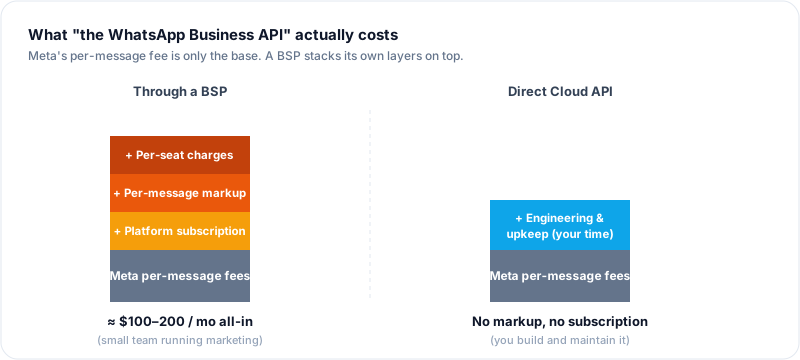
The headline platform fee is rarely the real bill — Meta's per-message fees and the BSP's own layers stack on top.
Coming later in 2026: Meta has signaled a move toward per-message volume-based / max-price bidding for marketing messages in some markets, further separating "marketing" economics from "utility/service." Treat any specific per-message number you read (including here) as approximate and check Meta's current rate card for your country before budgeting.
Why Applications and Templates Get Rejected
The two review gates fail for predictable reasons. Fixing these upfront is the single biggest timeline saver.
Business verification rejections
- Document/name mismatch — the business name on your legal document doesn't exactly match the name on your Meta portfolio.
- Unsupported or low-quality document — blurry scan, expired utility bill, or a document type Meta doesn't accept for your country.
- Domain not verified or mismatched — the website domain doesn't match the business, or domain verification wasn't completed.
- Phone/address not reachable or inconsistent — the contact details don't line up across your documents.
- Personal vs registered business — sole proprietors without formal registration often stall here; check your country's accepted-document list first.
Template rejections
Templates get rejected for a long list of reasons — commonly:
- Wrong category. Submitting a promotional message as "Utility" (to dodge marketing fees) is the top rejection. Per Meta's template categorization rules, it re-categorizes or rejects it. Match the category to the actual content.
- Placeholder/variable errors — variables like
{{1}}with no example content, mismatched counts, or a message that is only variables with no fixed text. - Formatting problems — leading/trailing whitespace, too many emojis, broken parameters, all-caps shouting.
- Prohibited or sensitive content — anything Meta's commerce/messaging policies restrict.
- Abusive or spammy language / misleading URLs — link shorteners and mismatched display URLs frequently trip this.
- Duplicate templates — same content submitted twice under different names.
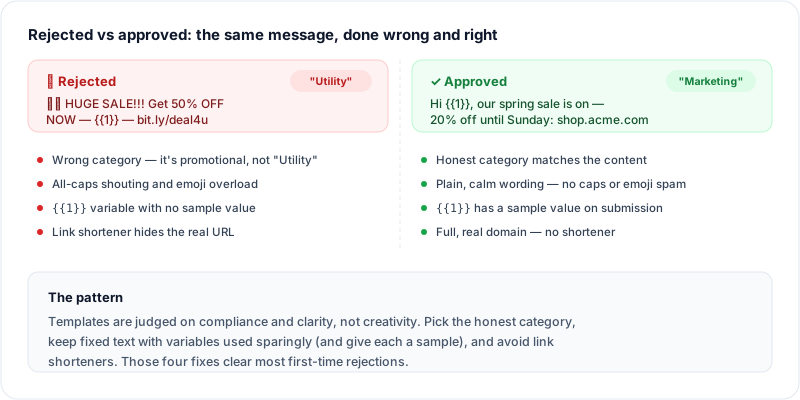
The same offer, rejected and approved — the difference is category honesty, plain wording, sample values, and real URLs.
The pattern: templates are rejected for compliance and clarity, not creativity. Keep fixed text, use variables sparingly with sample values, pick the honest category, and avoid link shorteners.
The Bottom Line
The WhatsApp Business API is powerful and, for the right team, worth the setup. But "the right team" is narrower than the flood of BSP marketing implies. If you need high-volume broadcasts, ads-driven growth, a verified badge, or messaging inside your own product, budget about two weeks, expect verification and template review to be the bottlenecks, and remember your real cost is Meta fees plus whatever a BSP layers on top.
If, on the other hand, you mostly want smart auto-replies on the number you already use, the whole apparatus above is overhead you may not need at all.
Frequently Asked Questions
How long does it take to get WhatsApp Business API access?
A smooth application takes a few days; a realistic one with any snag takes about two weeks. The technical connection is fast — the delay comes from two review queues you don't control: business verification (2 days to 2+ weeks depending on your documents) and message template approval (a few hours to a couple of days per template). Warming a new number up to high sending volume adds more time on top.
How much does the WhatsApp Business API cost in 2026?
There's no flat fee for API access itself — Meta hosts the Cloud API free and charges per message for Marketing, Utility, and Authentication templates, at rates that vary by country. Service replies inside the 24-hour customer window are free. If you use a BSP (Twilio, 360dialog, WATI, etc.), add their platform subscription and/or per-message markup on top of Meta's fees. A small marketing team commonly lands at $100–200/month all-in.
Can I use the WhatsApp Business API on my existing number?
Not while that number is active on a regular WhatsApp or WhatsApp Business App account. The API requires a number that isn't registered to a consumer app — either a fresh number or your existing one migrated through Meta's flow, which removes it from the app. You can't run both on the same number simultaneously.
What's the difference between the WhatsApp Business App and the Business API?
The Business App is a free, consumer-style app you operate by hand — good for one person, low volume, fixed greeting/away messages. The Business API is infrastructure for scale: bulk broadcasts, ads integration, multi-agent inboxes, automation, and the verified badge — but it requires verification, approved templates, per-message fees, and a dedicated number. Most solo owners need the app; teams sending at scale need the API.
Why do WhatsApp message templates get rejected?
Most often for wrong category (submitting a promotional message as "Utility"), variable/placeholder errors, formatting problems (extra whitespace, emoji overload), prohibited content, link shorteners or misleading URLs, or duplicate templates. Templates are judged on compliance and clarity, not creativity — keep fixed text, use variables with sample values, and pick the honest category.
Is the on-premise WhatsApp Business API still available?
No. Meta sunset the self-hosted On-Premises API in October 2025. The cloud-hosted API is now the only path, and it's simpler — no servers to run, faster feature access, and Meta hosts it free (you pay only for messages).
Official Sources
The details above are drawn from Meta's own documentation. Bookmark these for the current, authoritative version — WhatsApp's policies and rates change, and your country's numbers may differ:
- About the WhatsApp Business Platform — Meta's overview of Cloud API and the platform.
- Pricing on the WhatsApp Business Platform — the per-message model and per-country rate cards.
- Template categorization guidelines — how Marketing / Utility / Authentication are decided and enforced.
- Verify your business in Meta Business Suite — the business-verification requirements and process.
- On-Premises API Sunset notice — confirmation that self-hosting ended in October 2025.
If your goal is AI auto-reply on the WhatsApp number you already use — not broadcasts, ads, or a verified badge — you can skip this entire process. WhatsApp AI Pro connects to your existing account by QR code (the same way WhatsApp Web does), so there's no Meta verification, no template approvals, and no separate business number. AI replies go live in about 15 minutes, and your conversations stay on your own machine. It's built for inbound and warm outbound, not high-volume cold broadcasts — for that, the Business API above is still the right tool.
Related guides: