
The 7 Best WATI Alternatives in 2026 (Cheaper & No-API Options Compared)
Looking for a WATI alternative? We compare 7 — cheaper WhatsApp Business API platforms, no-API options, and AI auto-reply tools — with real pricing and who each is best for.
Most people searching for a WATI alternative want one of three things: a cheaper plan, a tool that doesn't bury AI behind a higher tier, or — most often — something they can actually get running without the WhatsApp Business API ordeal. This guide compares the seven best WATI alternatives in 2026, what each costs, and who each one is for.
First, the pain that sends people looking:
"The website looked great — solid features, reasonable price. After signing up I realized I needed to apply for the Meta Business API, verify my Facebook page, set up a phone number, submit message templates for approval… two weeks later I still hadn't sent a single auto-reply."
That's not really WATI's fault — it's built for companies with an ops team, and the WhatsApp Business API process reflects that. The irony is that many people buy it because they're short-handed, and then setup eats the time they don't have. Below are the alternatives worth considering instead.
Quick Answer: The Best WATI Alternative for Each Need
- No WhatsApp Business API, fastest setup: WhatsApp AI Pro — connects to your existing number by QR code, AI auto-reply live in ~15 minutes, data stays local.
- Multi-channel support teams: Respond.io — WhatsApp + Instagram + email in one inbox with an autonomous AI agent.
- Cheapest WhatsApp API broadcasts: AiSensy — low platform fee, strong campaign tooling.
- Shopify / e-commerce: Interakt or Zoko — built around catalogs, carts, and order flows.
- Sales-led teams (APAC/India): Gallabox or DoubleTick — shared inbox plus pipeline tooling.
If you don't actually want the Business API at all, skip to WhatsApp AI Pro. Otherwise the comparison table sorts the rest.
WATI Alternatives Compared at a Glance
| Tool | Needs Business API? | AI auto-reply | Starting price | Best for |
|---|---|---|---|---|
| WhatsApp AI Pro | No (QR / WhatsApp Web) | Built in, day one | $49/mo · $499/yr | No-API, small teams, privacy |
| Respond.io | Yes | AI agent (at Growth tier) | $79/mo (AI at $159) | Multi-channel support teams |
| AiSensy | Yes | Add-on | from ~$20/mo | Budget broadcasts |
| Gallabox | Yes | No-code bots + AI | from ~$30/mo | Sales teams (APAC/India) |
| Interakt | Yes | Bots + AI | from ~$20/mo | Shopify / SMB commerce |
| Zoko | Yes | Bots | from ~$35/mo | Shopify catalog selling |
| DoubleTick | Yes | Bots + broadcast | from ~$30/mo | Mobile-first sales teams |
Pricing verified June 2026 and approximate for some vendors — plans change often, so check each site. The column that matters most is "Needs Business API?" — it decides whether you face Meta verification, per-message fees, and a separate business number, or not.
Why Teams Leave WATI in the First Place
Two reasons come up again and again.
1. Setup is heavy
WATI sits on top of the WhatsApp Business API, so you go through Meta's full pipeline: register a Meta Business Manager account, submit business verification, apply for API access, connect your Facebook page and number, write message templates and submit them for Meta approval (one day if you're lucky, three or four if not), then build and test your bot flows. Smooth case: a few days. Stuck in review: two weeks is normal. After that, the dashboard itself — inbox rules, broadcast settings, flow builder, agent routing — takes time to learn.
2. The bill is bigger than the headline, and AI hides upstream
| WATI plan | Annual /mo | Monthly /mo | What you get |
|---|---|---|---|
| Growth | $39 | $49 | 3 users, 1 channel, basic chatbot — no AI |
| Pro | $79 | $99 | 5 users, AI Automation, multi-channel |
| Business | $199 | $249 | Advanced AI agents, multiple numbers |
Two things small teams miss when they sign up on Growth:
- AI isn't there. The auto-reply intelligence most people are shopping for unlocks at the Pro tier ($79/mo annual, $99/mo monthly). Growth is a shared inbox with a rule-based bot, not an AI assistant.
- Meta message fees stack on top. Because WATI runs on the Business API, you also pay Meta's per-conversation fees, and WATI adds roughly a 20% markup. A modest Growth user lands around $50–70/mo all-in; a Pro team running marketing clears $150/mo once message fees and extra-user charges layer in.
So the honest comparison for AI auto-reply isn't "$39 WATI vs X." It's WATI Pro at $99/mo plus per-message fees against the alternatives below.
The 7 Best WATI Alternatives in 2026
1. WhatsApp AI Pro
Best for: small teams that want AI on their existing WhatsApp number without the Business API.
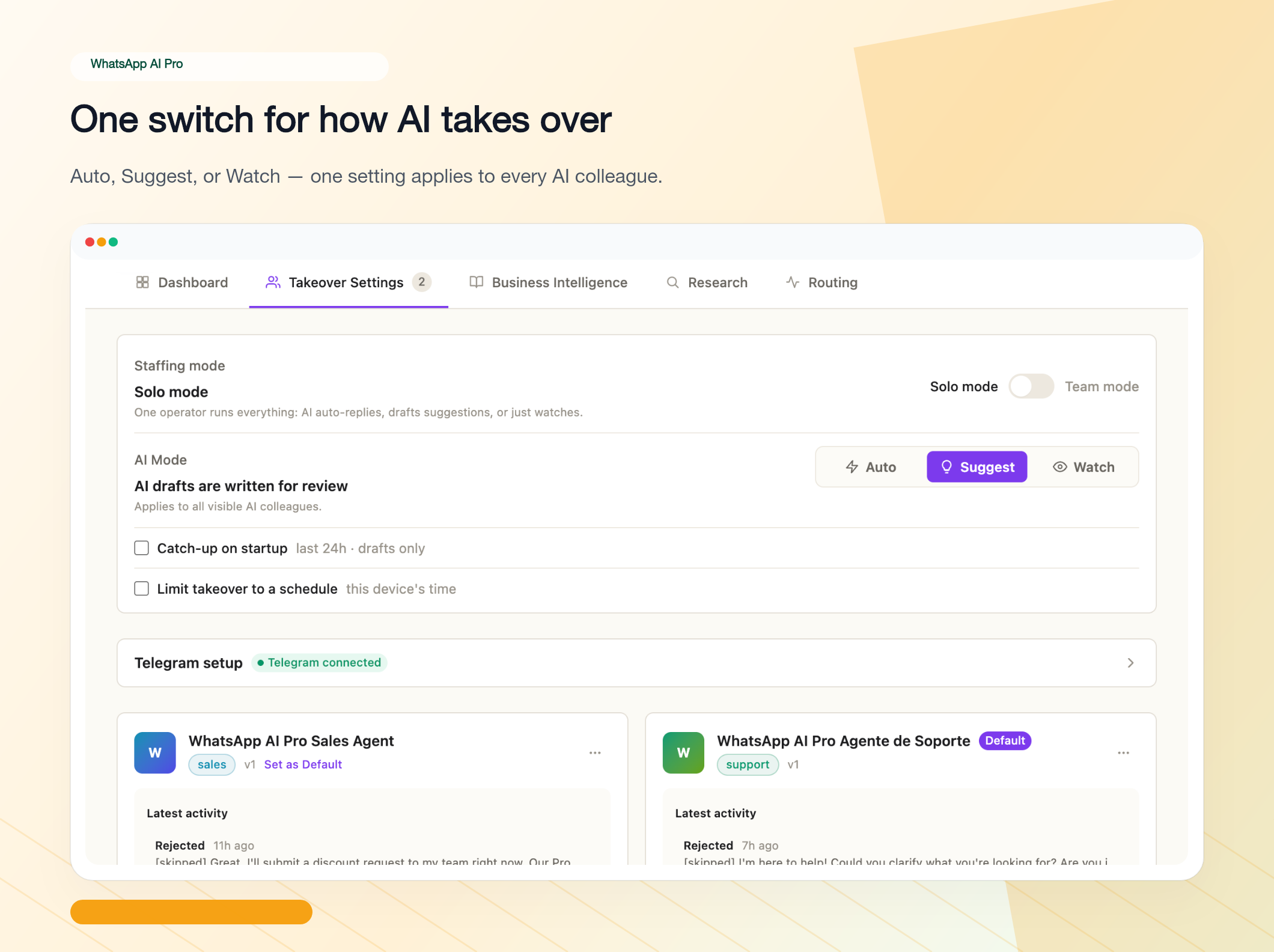
WhatsApp AI Pro is the one alternative here that skips the API entirely. It's a desktop app (macOS/Windows) that connects to your existing WhatsApp account by QR code — the same flow as WhatsApp Web — then runs AI agents, real-time translation across 90+ languages, and a knowledge-base reply engine over your conversations.
Why it's the top WATI alternative for small teams:
- No Business API. No Meta verification, no template approvals, no green-badge submission. Scan a QR code and you're in — first AI auto-reply in about 15 minutes.
- AI from day one, not gated behind a Pro tier. Upload your catalog, pricing, and FAQs; it answers in free-form natural language and checks each reply before sending.
- Flat $49/mo ($499/year) — no per-message fees, no per-contact fees, no Meta markup.
- Local data. Conversations stay on your machine, which matters under GDPR/PDPA/LGPD.
Honest trade-offs: no green verified badge, no high-volume official template broadcasts, and no form-style bots — it deliberately skips structured field-by-field collection (application forms, registration flows), because free-form conversation is what its AI is built for. The desktop app also needs your computer on to keep replying (a spare machine or VM handles 24/7). It's built for inbound and warm outbound, not cold mass campaigns. Pricing: $49/mo or $499/yr, plus a $19 one-time 7-Day Pass and a 7-day money-back guarantee.
2. Respond.io
Best for: support teams running multiple channels.
Respond.io is an omnichannel platform — WhatsApp, Instagram, Messenger, TikTok, email, SMS, web chat in one inbox — with the most mature autonomous AI agent in this list (RAG-grounded, multi-turn, voice-capable, CRM-aware). If WhatsApp is one of several channels you handle, it's built for that shape.
Watch out for: it still requires the WhatsApp Business API, and pricing is per Monthly Active Contact (MAC). The AI agent only unlocks at the Growth tier — $159/mo annual ($199 monthly) — while Starter ($79/$99) is essentially a shared inbox. See our full Respond.io vs WATI breakdown.
3. AiSensy
Best for: teams whose priority is cheap, high-volume broadcasts.
AiSensy is a popular low-cost WhatsApp Business API platform, strong in India and emerging markets, centered on broadcast campaigns, click-to-WhatsApp ads, and a chatbot builder, with AI available as an add-on. If the lowest platform fee for marketing blasts is your goal, it's a direct WATI competitor on price.
Watch out for: still API-based (Meta verification + per-message fees apply), and the native "AI" leans toward flow automation more than free-form LLM answering — confirm the AI tier covers what you need.
4. Gallabox
Best for: sales-led teams, especially across APAC and India.
Gallabox pairs a shared team inbox with a no-code bot builder, drip campaigns, and increasingly capable AI, plus integrations into Shopify, CRMs, and Zapier. Teams that treat WhatsApp as a sales pipeline tend to like its per-seat clarity and workflow tooling.
Watch out for: API-based, so verification and per-message fees still apply. Confirm the current AI tier delivers genuine LLM replies rather than scripted flows.
5. Interakt
Best for: Shopify stores and SMBs that want commerce baked in.
Interakt (built by the Jio Haptik team) is an affordable WATI-style platform with tight Shopify integration — abandoned-cart recovery, order updates, catalog messaging — plus shared inbox, broadcasts, and bots. For small e-commerce sellers it often comes in cheaper than WATI's AI tier.
Watch out for: API-based; advanced automation and AI sit on higher plans. Strongest specifically for the e-commerce use case.
6. Zoko
Best for: Shopify merchants selling directly in WhatsApp.
Zoko is built around WhatsApp commerce — browsing a catalog, building a cart, and checking out inside the chat — with broadcast and bot tooling on top. If your goal is selling products in-thread rather than just answering questions, Zoko is purpose-built for it.
Watch out for: API-based, and it's priced toward commerce teams (typically higher than the budget options). Overkill if you only need auto-reply.
7. DoubleTick
Best for: mobile-first sales teams that live in broadcasts and quick replies.
DoubleTick is a sales-focused WhatsApp API tool with a strong mobile app, bulk broadcasting, catalog sharing, and a shared team inbox — popular with distributor and reseller-style sales teams who work from their phones.
Watch out for: API-based; AI/automation depth is lighter than Respond.io's. Best when fast broadcasting and a mobile CRM matter more than autonomous AI.
WhatsApp AI Pro vs WATI: Head-to-Head
Since WhatsApp AI Pro is the one alternative that drops the API entirely, here's the direct comparison most readers want:
| WhatsApp AI Pro | WATI | |
|---|---|---|
| Time to go live | ~15 minutes | Days to two weeks |
| Price for AI auto-reply | $49/mo flat ($499/year) | $99/mo (Pro, monthly) + message fees |
| Per-message fees | None | Meta fees + ~20% markup |
| API application required | No | Yes |
| Meta verification required | No | Yes |
| Backend complexity | Minimal | Significant |
| AI auto-reply | Built in from day one | Unlocks at Pro tier |
| Where your data lives | Your own computer | BSP / Meta servers |
| Bulk broadcasts | Not the focus | Stronger |
| Green verified badge | No | Yes |
| Best fit | Small teams, low patience for setup | Ops teams that need API features |
How to Choose Your WATI Alternative
| Your situation | Best pick |
|---|---|
| Want AI on your existing number, no Meta verification | WhatsApp AI Pro |
| Need local/private data storage (GDPR/PDPA/LGPD) | WhatsApp AI Pro |
| Cross-border, multilingual auto-reply | WhatsApp AI Pro (90+ languages) |
| Run WhatsApp + other channels in one inbox | Respond.io |
| Cheapest possible API broadcasts | AiSensy |
| Shopify store, commerce flows | Interakt or Zoko |
| Sales team working from phones | Gallabox or DoubleTick |
| Collect applications or registrations with form-style bots | Stay on WATI, or Gallabox / Interakt |
| Need green badge + high-volume official broadcasts | Stay on WATI |
The honest move if you're torn: start a free trial on your top two in the same week, route real inbound through each, and keep the inbox your team actually wants to live in.
Frequently Asked Questions
Is there a free WATI alternative?
There's no genuinely free tool that does AI auto-reply well. The free WhatsApp Business app gives you fixed greeting and away messages — no AI, no understanding of what customers actually ask. Most paid alternatives, WhatsApp AI Pro included, run a free trial instead so you can test the real thing before paying. If "free" is a hard requirement, the Business app is your only option, with the limits that come with it.
What's the cheapest WATI alternative for AI replies?
Once you count what you actually get, entry prices are closer than they look. WATI's AI starts at the Pro tier ($79/mo annual, $99/mo monthly) plus per-message Meta fees. Among API platforms, AiSensy and Interakt have the lowest platform fees. If you don't need the API at all, WhatsApp AI Pro is $49/mo flat ($499/year) with no message fees and AI from the start — usually cheaper than WATI Pro once message volume is counted.
Can I use a WATI alternative without the WhatsApp Business API?
Yes. WhatsApp AI Pro connects to your existing WhatsApp account by QR code — the same way WhatsApp Web does — so there's no Business API application, no Meta verification, and no template approval. Every other tool on this list (Respond.io, AiSensy, Gallabox, Interakt, Zoko, DoubleTick) is built on the Business API. The trade-off for the no-API route is no green badge and no high-volume official broadcasts.
Will I lose my WhatsApp number or chat history switching from WATI?
If you move to a QR-code tool like WhatsApp AI Pro, no — it runs on the WhatsApp account you already have, so your number and existing chats stay put. There's no migration step. Moving between API platforms (e.g. WATI to another BSP) is more involved and usually tied to a dedicated business number.
Which WATI alternative is best for non-English customers?
WhatsApp AI Pro replies in the customer's own language automatically — it detects the incoming language and answers in kind across 90+ languages, which suits exporters and cross-border sellers whose messages arrive in Spanish, Portuguese, Arabic, or Chinese at all hours. Most API platforms support multilingual templates but make you build and maintain them per language.
Can WhatsApp AI Pro collect applications or form data like WATI's flow bots?
No — and that's deliberate. WATI, Gallabox, and the other API platforms include flow builders that walk customers through fixed fields (name, email, budget), which is the right tool for structured intake like applications or registrations. WhatsApp AI Pro takes the opposite bet: free-form AI conversation grounded in your documents. It answers applicants' questions in natural language, but it won't collect submissions into structured fields. If you need both, use a form link for the intake step and let the AI handle every conversation around it.
Is WATI or Respond.io the better choice?
They solve different problems: WATI is WhatsApp-first with strong broadcast and onboarding; Respond.io is omnichannel with a more autonomous AI agent. We compare them in depth — pricing, AI, setup — in Respond.io vs WATI 2026.
If WATI feels too heavy for your team, the fastest alternative to try is the no-API one: install WhatsApp AI Pro, scan a QR code, and run your first AI auto-reply in about 15 minutes. Download here — $49/month (or $499/year), 7-day money-back guarantee.
Related guides: