
โหมดอนุมัติร่าง: วิธีที่ปลอดภัยในการให้ AI จัดการการขายผ่าน WhatsApp
ยังไม่พร้อมให้ AI ตอบเอง? โหมดร่างหมายความว่า AI เขียน คุณอนุมัติ คลิกเดียวส่ง ควบคุมเต็มที่ ไม่มีความเสี่ยง
"ถ้า AI พูดอะไรผิดล่ะ?"
นี่คือสิ่งแรกที่ทุกคนถาม ถ้ามันบอกราคาผิด? ถ้ามันสัญญาว่าส่งวันศุกร์ทั้งที่จริงๆ ต้องสามสัปดาห์? ถ้ามันตอบลูกค้าองค์กรด้วยน้ำเสียงเป็นกันเองเกินไป?
เป็นข้อกังวลที่สมเหตุสมผล และคำตอบตรงๆ คือ: ใช่ AI สามารถผิดได้ โดยเฉพาะช่วงแรกที่ฐานความรู้ยังปรับจูนไม่เสร็จ นั่นคือเหตุผลที่คุณไม่ควรเริ่มด้วย auto-reply
โหมดอนุมัติร่างหมายความว่า AI เขียนทุกข้อความตอบกลับ แต่ไม่มีอะไรถึงลูกค้าจนกว่าคุณจะอนุมัติ
วิธีการทำงาน
ลูกค้าส่งข้อความ WhatsApp AI อ่าน ตรวจสอบฐานความรู้ แล้วเขียนข้อความตอบกลับ ข้อความนั้นปรากฏเป็น draft — คุณเห็น ลูกค้ายังไม่เห็น คุณมีสามตัวเลือก:
- อนุมัติ แล้วส่งคลิกเดียว
- แก้ไข ปรับคำแล้วส่ง
- ปฏิเสธ แล้วเขียนคำตอบเองจากศูนย์
ลูกค้าเห็นแค่คำตอบที่เร็วและแม่นยำ ไม่รู้ว่ามี AI เกี่ยวข้อง ยิ่งไม่รู้ว่ามีคนตรวจสอบก่อนส่ง
สองสัปดาห์ในโหมดร่าง เป็นยังไงจริงๆ
วันที่ 1-2 คุณอ่านทุก draft อย่างละเอียด บางอันดี บางอันพลาดน้ำเสียง — ทางการเกินไปหน่อย หรือใช้คำที่คุณไม่เคยใช้ คุณแก้ประมาณ 30% คุณสังเกตเห็นช่องว่างในฐานความรู้ไม่กี่จุดแล้วเพิ่มข้อมูลที่ขาด
วันที่ 3-5 draft ดีขึ้น คุณแก้แค่ประมาณ 15% แล้ว ส่วนใหญ่เป็นเรื่องเล็ก — เปลี่ยนคำลงท้าย ปรับวิธีเขียนเวลาจัดส่ง คุณเริ่มอนุมัติ draft ส่วนใหญ่โดยไม่ต้องแก้
สัปดาห์ที่ 2 คุณอนุมัติ 95%+ โดยไม่แตะเลย AI จับน้ำเสียงของคุณ ความรู้สินค้า วิธีเฟรมเรื่องของคุณได้แล้ว คุณเริ่มคิดจะเปลี่ยนบทสนทนาทั่วไปเป็น auto mode
หลังสองสัปดาห์ คุณเปิด auto-reply สำหรับคำถามมาตรฐาน — เรื่องราคา เช็คสต็อก ข้อมูลจัดส่ง โหมดร่างยังเปิดอยู่สำหรับบทสนทนามูลค่าสูง การเจรจาซับซ้อน และลูกค้า VIP คุณยังควบคุมในส่วนที่สำคัญ แต่ AI จัดการปริมาณ
ไม่มีใครควรมอบบทสนทนาลูกค้าให้ AI แบบหลับตาตั้งแต่วันแรก แต่การเปลี่ยนจาก "ตรวจทุกอย่าง" เป็น "ไว้ใจสำหรับเรื่องทั่วไป" มักใช้เวลาประมาณสองสัปดาห์ถ้าฐานความรู้ดี
ไม่ใช่แค่เรื่องการควบคุม
โหมดร่างเป็นกลไกการฝึกด้วย
เมื่อคุณเปลี่ยน "ด้วยความเคารพ" เป็น "ขอบคุณครับ" AI จดจำคำลงท้ายที่คุณชอบ เมื่อคุณปรับราคา มันอัปเดตข้อมูลอ้างอิง เมื่อคุณเขียนคำอธิบายสินค้าใหม่ มันใช้สำนวนของคุณ
ทุกการแก้ไขที่คุณทำในโหมดร่างคือการสอน AI ให้ตรงกับสไตล์ของคุณ สองสัปดาห์ในโหมดร่างไม่ใช่แค่เรื่องจับข้อผิดพลาด — มันกำลังทำให้ AI เก่งขึ้นในการเป็นคุณ
ความเร็ว: โหมดร่าง vs พิมพ์ทุกอย่างเอง
บางคนถาม: ถ้าต้องตรวจทุกข้อความอยู่ดี มันเร็วกว่าพิมพ์เองยังไง?
นี่คือตัวเลข ตอบเอง: อ่านข้อความ คิดคำตอบ เปิดสเปรดชีตหาข้อมูลสินค้า พิมพ์คำตอบ ตรวจทาน ส่ง 3-5 นาทีต่อข้อความ
อนุมัติร่าง: อ่านข้อความ อ่าน draft ของ AI แตะอนุมัติ 10-15 วินาที
แม้ต้องตรวจทุกข้อความ คุณก็เร็วกว่าทำเอง 10-20 เท่า AI ทำงานหนักให้ — ค้นหาความรู้ จัดรูปแบบ จับคู่ภาษาลูกค้า คุณแค่ตรวจสอบ
เมื่อ AI หลีกทาง
ไม่ใช่ทุกบทสนทนาที่ควรได้ draft บางเรื่องต้องการคนทันที
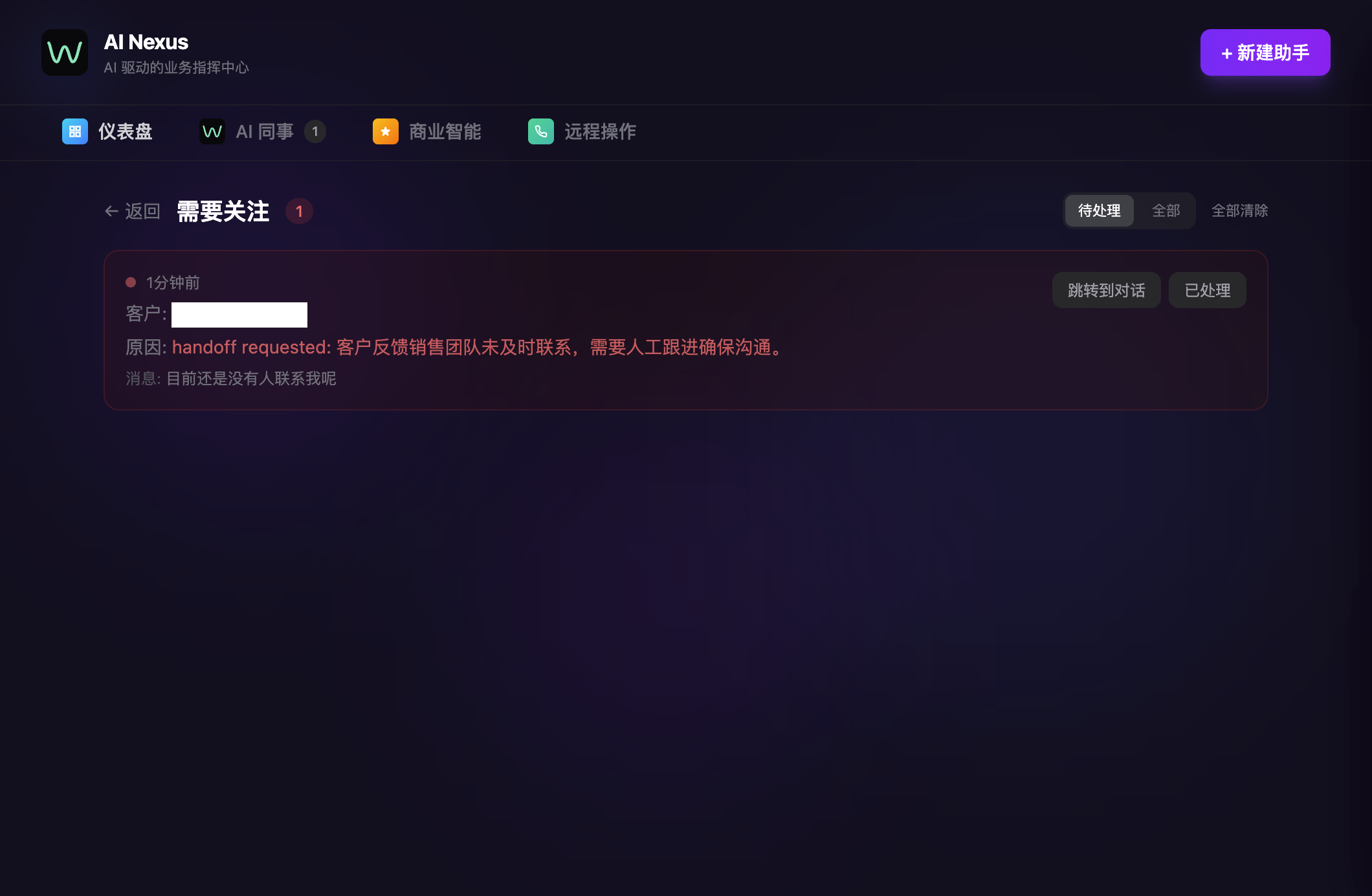
WhatsApp AI Pro ตรวจจับสถานการณ์ที่ต้องใช้วิจารณญาณของมนุษย์: ลูกค้าที่โกรธหรือหงุดหงิด คำขอเกี่ยวกับราคาพิเศษหรือการเจรจาซับซ้อน หัวข้อที่เกี่ยวกับกฎหมาย ลูกค้า VIP ที่ tag ไว้ในระบบ profiling บทสนทนาที่โต้ตอบไปมาเกินเกณฑ์ที่คุณตั้ง
เมื่อทริกเกอร์เหล่านี้ทำงาน AI ไม่ draft ข้อความตอบกลับ มันส่งการแจ้งเตือนส่งต่อ (ผ่าน Telegram ถ้าเชื่อมต่อไว้) พร้อมสรุปบทสนทนาเพื่อให้คุณเข้ามาพร้อมบริบทเต็ม
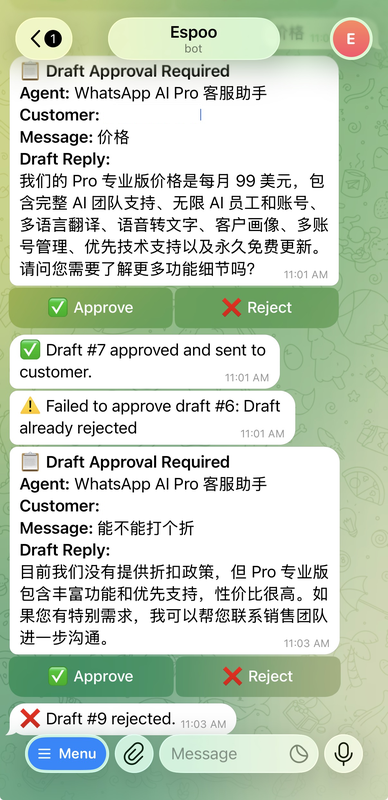
และรายละเอียดที่ป้องกันปัญหา "เดี๋ยว ใครกำลังคุยอยู่?": เมื่อคุณเข้ามาจัดการบทสนทนา AI หยุดอัตโนมัติสำหรับลูกค้ารายนั้น ไม่มี draft ไม่มี auto-reply ขณะที่คุณแชทอยู่ พอคุณหยุดตอบ (หลังระยะเวลาที่คุณตั้งค่า) AI กลับมาทำงานต่อ ไม่ต้องสลับเอง
สามโหมด
เพื่อให้เห็นภาพรวม:
| โหมด | AI ทำ | คุณทำ |
|---|---|---|
| ร่าง | เขียนข้อความตอบกลับ รอการอนุมัติ | ตรวจสอบ อนุมัติ/แก้ไข ส่ง |
| อัตโนมัติ | เขียนและส่งอัตโนมัติ | ได้รับแจ้งเตือน เข้ามาจัดการเมื่อจำเป็น |
| สังเกตการณ์ | ดูบทสนทนา เรียนรู้ | ตอบเอง AI ศึกษาสไตล์คุณ |
สลับได้ตลอดเวลา คนส่วนใหญ่ลงเอยกับการผสม
 : auto สำหรับบทสนทนาทั่วไป draft สำหรับเรื่องสำคัญ observe เมื่อกำลังทดสอบเนื้อหาฐานความรู้ใหม่
ผู้ใช้บางคนอยู่ในโหมดร่างตลอดไป พวกเขาชอบการควบคุมและความเร็วที่เพิ่มขึ้นก็มากพอเมื่อเทียบกับพิมพ์ทุกอย่างเอง นั่นก็เป็นวิธีใช้ที่ดี — ไม่มีแรงกดดันให้ไป full auto
ความเชื่อมั่นต้องสร้างขึ้น โหมดร่างคือวิธีที่คุณสร้างมัน
ดาวน์โหลด WhatsApp AI Pro — เริ่มด้วยโหมดร่าง ไม่มีความเสี่ยง